KillerPDF 1.9.2 Respects PDF Permissions and Edits Scanned Text
The free PDF editor now honors owner restrictions, lets you fix recognized text on scans and prints in reverse order.

You know the moment: a PDF arrives, you hit print, and the page order comes out backwards because the stack lands face up. Small thing, big annoyance. KillerPDF 1.9.2 finally has an answer for it, and it comes with a bigger story about trust in the files you open.
KillerPDF is a free, open-source PDF editor for Windows 10 and 11, and this release leans hard on respect for documents. When a PDF's owner has set limits on saving, printing or exporting, the editor now follows them instead of quietly ignoring them. That also means files with protection hidden in unusual places, such as linearized files or ones with large cross-reference streams, are no longer mistaken for unprotected documents.
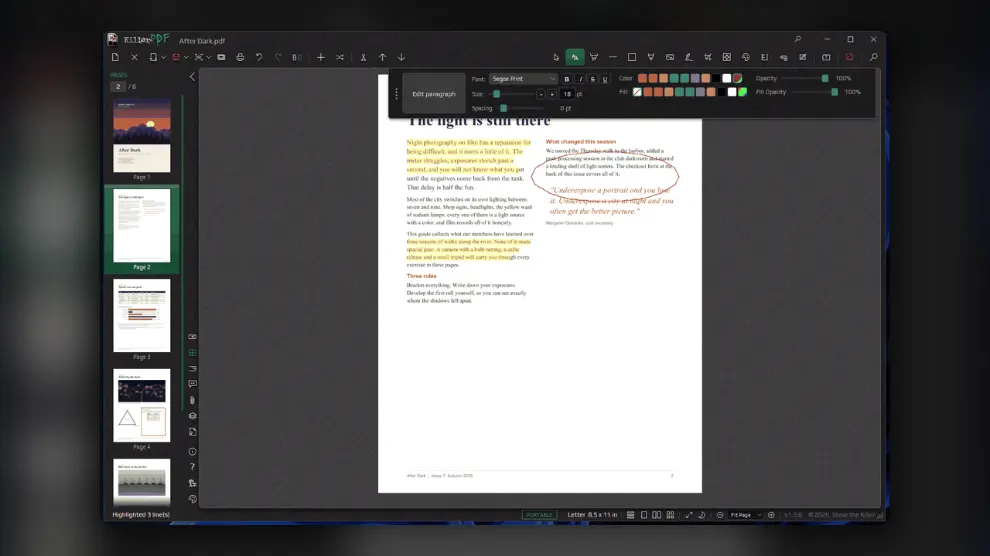
KillerPDF's markup tools in action. The screenshot is the official one from the project page.
Scans you can actually edit
The headline feature for everyday use: text recognized on scanned pages can be edited directly. If you have ever squinted at an OCR typo in a scanned contract, you will appreciate not having to retype the whole line somewhere else. Printing gains reverse-order and binding-edge options, which is handy when you print double-sided and want the pages to land in the right order.
Fewer ways to lose work
Most of the release is quiet repair work, and it is the kind that matters when a file is important. A damaged encrypted PDF with a missing encryption trailer is now refused before saving, instead of being rewritten with unreadable pages. If rendering fails and the app recovers a document, the recovered tab keeps its protection and your unsaved edits, and a document that does not reopen is listed for review.
Signed PDFs get careful treatment too. A signed file that needs a password opens read-only and keeps its signatures. Removing or changing a signed field can be undone, and fields stay signed through Undo, Redo and tab switches. Saving and exporting also protect existing files: a failed ZIP export no longer clobbers an archive, canceling Save Flattened leaves the destination untouched, and PDFs opened from a ZIP ask for a permanent location on first save.
The developer also lists fixes for comments, forms, zoom, text selection and update relaunches.
Our verdict
If KillerPDF is already your go-to for quick edits, update today: the protection handling and the safer save paths are exactly what you want in a tool that touches important documents. If you are shopping for a free editor, this is a good moment to try it, especially when you deal with scans, signed files or paper that has to come out of the printer in the right order. People who need heavy-duty prepress features will still want a larger suite, but for everyday PDF chores the 1.9.2 build is a confident step.
Get it on UpdateStar
about author